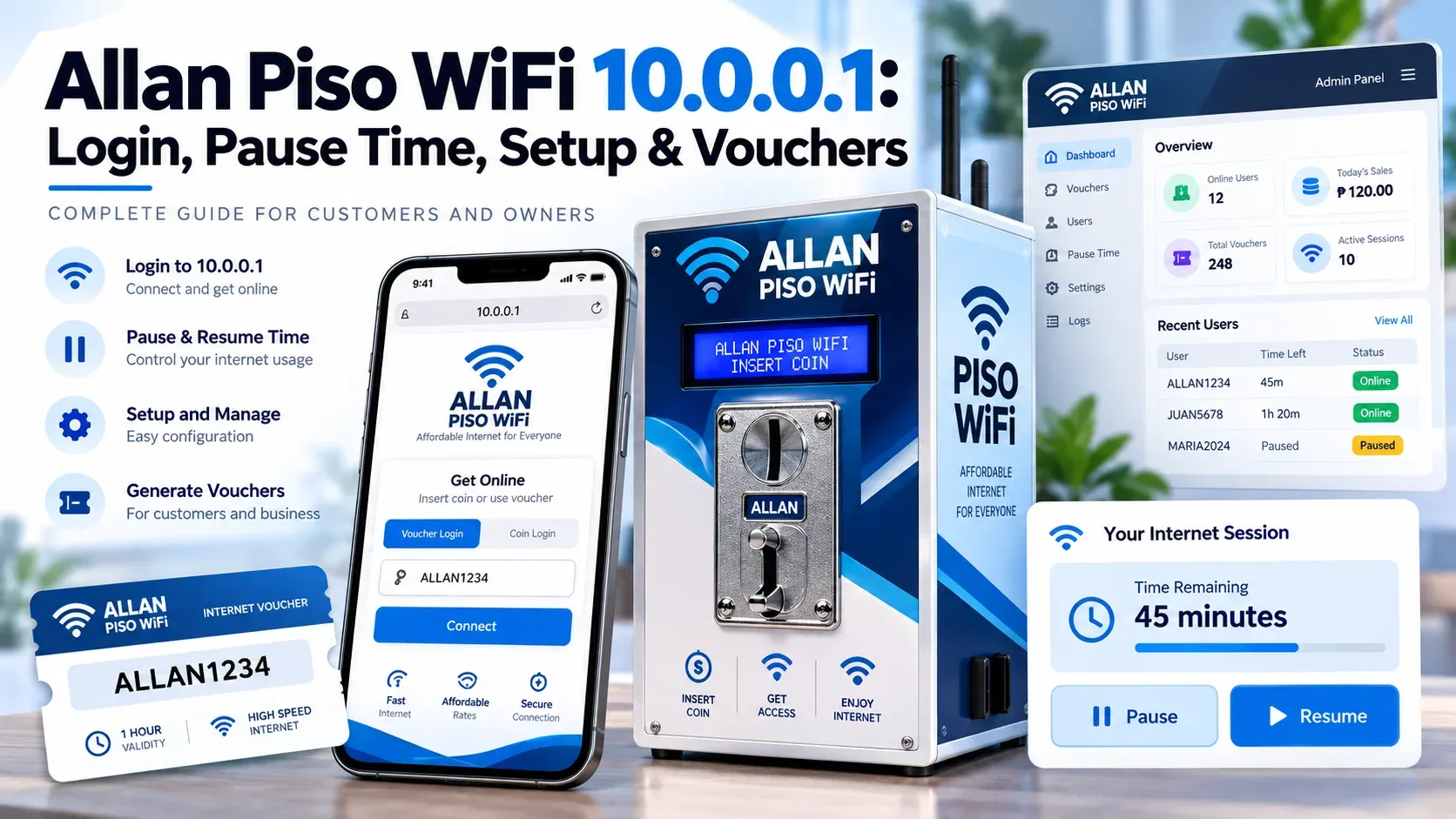
If the portal doesn't open, a coin isn't detected, or the time continues to expire, a paid WiFi session becomes hard to manage. Allan Piso WiFi provides users with a temporary internet connection by using coins, vouchers and time limits. Some setups include Pause Time to assist in saving unused minutes.
Customers can use the 10.0.0.1 portal to view their session, enter voucher codes and utilise available payment or Pause options. Owners control rates, network, hardware, and customers from their authorised controls. We’ll guide you on how to log in, use Pause Time, activate vouchers, set up the machine, solve common problems, and keep the system working properly.
What Is Allan Piso WiFi?
Allan Piso WiFi is one of the paid internet vending systems. Customers plug in their cell phones, tablets or laptops and get internet access according to the time or package they buy. It can be used in areas where people have a need for cheap internet for brief durations.
The name can also be used to describe a complete ready-to-use vendo package or an Allan coin-slot component for a custom-built vendo. A complete unit is a machine that has several parts pre-packaged, whereas a custom setup will need to be configured with hardware. This difference is important when planning for installation or maintenance.
Where Allan Piso WiFi Is Available
This network is often placed in local areas where people need quick and low-cost internet access. You may find these machines in places such as:
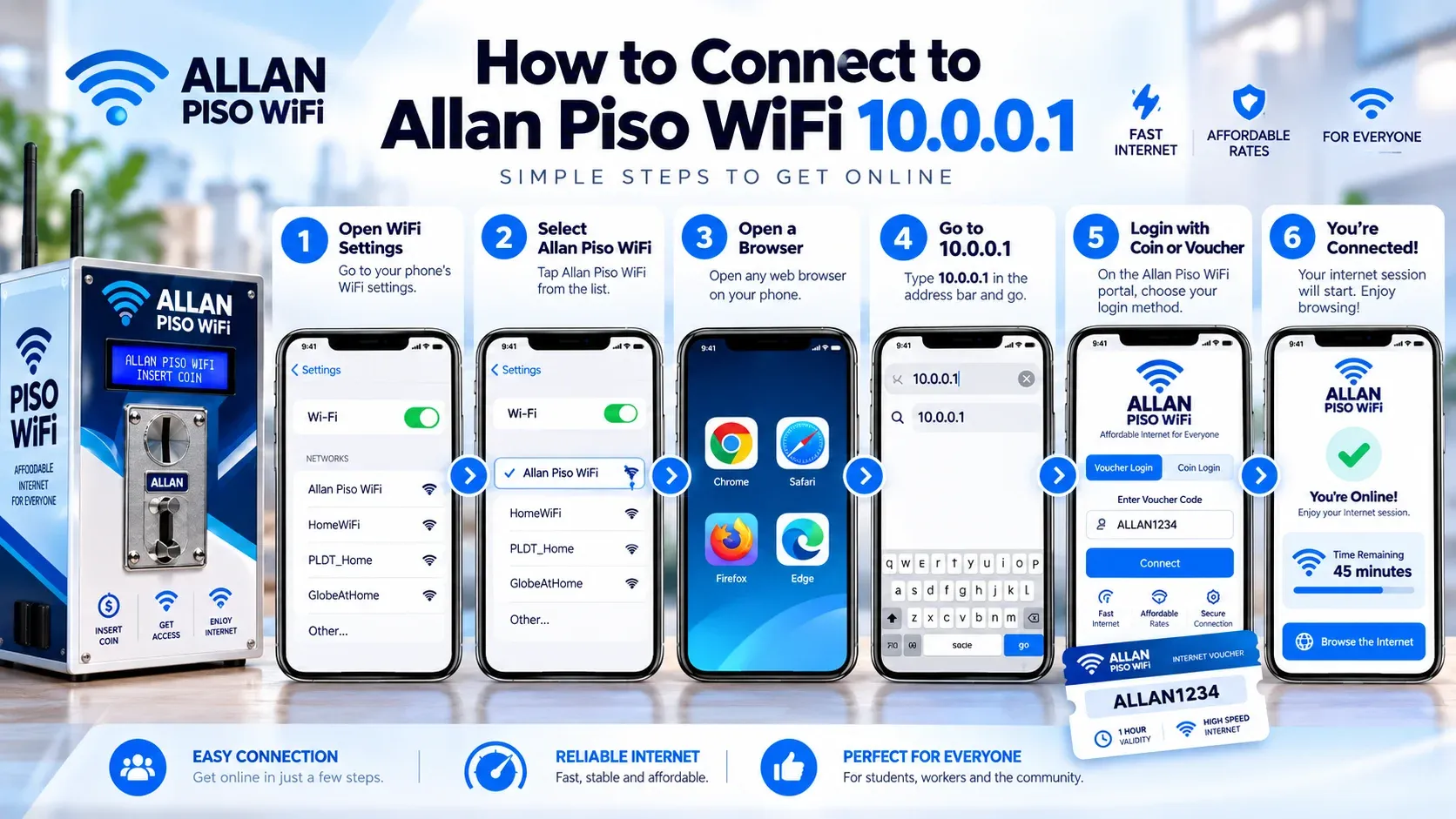
How to Connect to Allan Piso WiFi 10.0.0.1
You need to connect your device to the correct local network before opening the customer portal. Once connected, you can use 10.0.0.1 to access your session, payment, or voucher options. Here is how to connect:
- 1Open WiFi settings on your phone or laptop.
- 2Select the Allan WiFi network.
- 3Wait until your device connects.
- 4Open Chrome, Safari, or another browser.
- 5Type 10.0.0.1 directly in the address bar.
- 6Wait for the customer portal to appear.
- 7Choose an available payment or voucher option.
- 8Confirm your session and start browsing.
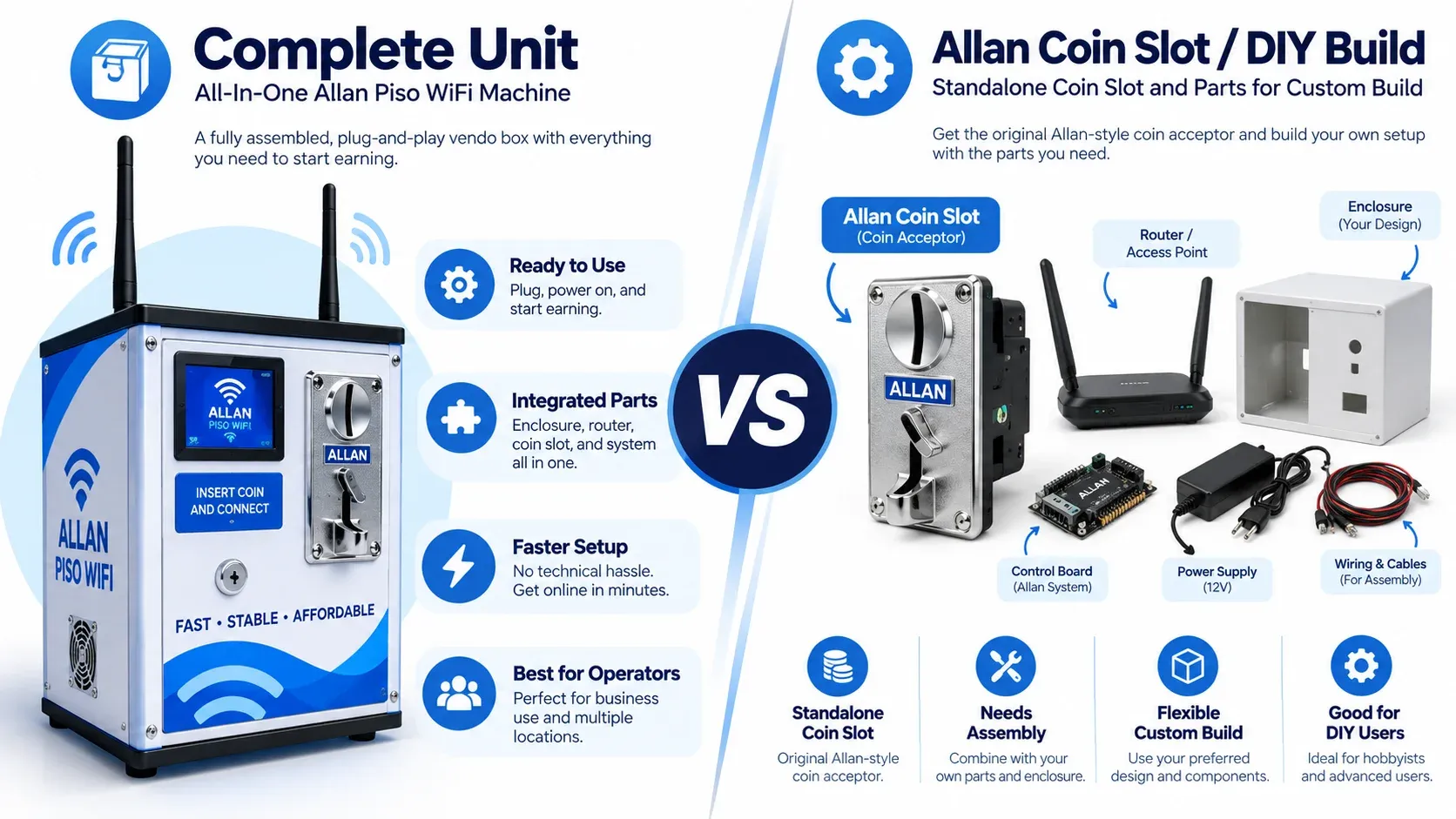
Complete Unit or Allan Coin Slot
It can be set up in two main ways. You can buy a complete plug-and-play unit or use an Allan coin slot to build your own machine.
A plug-and-play package comes mostly assembled and ready for setup. It normally combines the vendo case, router, coin slot, and power components in one unit. This option requires less hardware work and may suit you if you want a simpler installation.
The standalone Allan coin slot is built for a custom Piso WiFi vendo build. You can combine it with a compatible control board and a single-board computer, such as a Raspberry Pi or Orange Pi. This option gives you more control over the hardware but requires proper wiring and configuration.
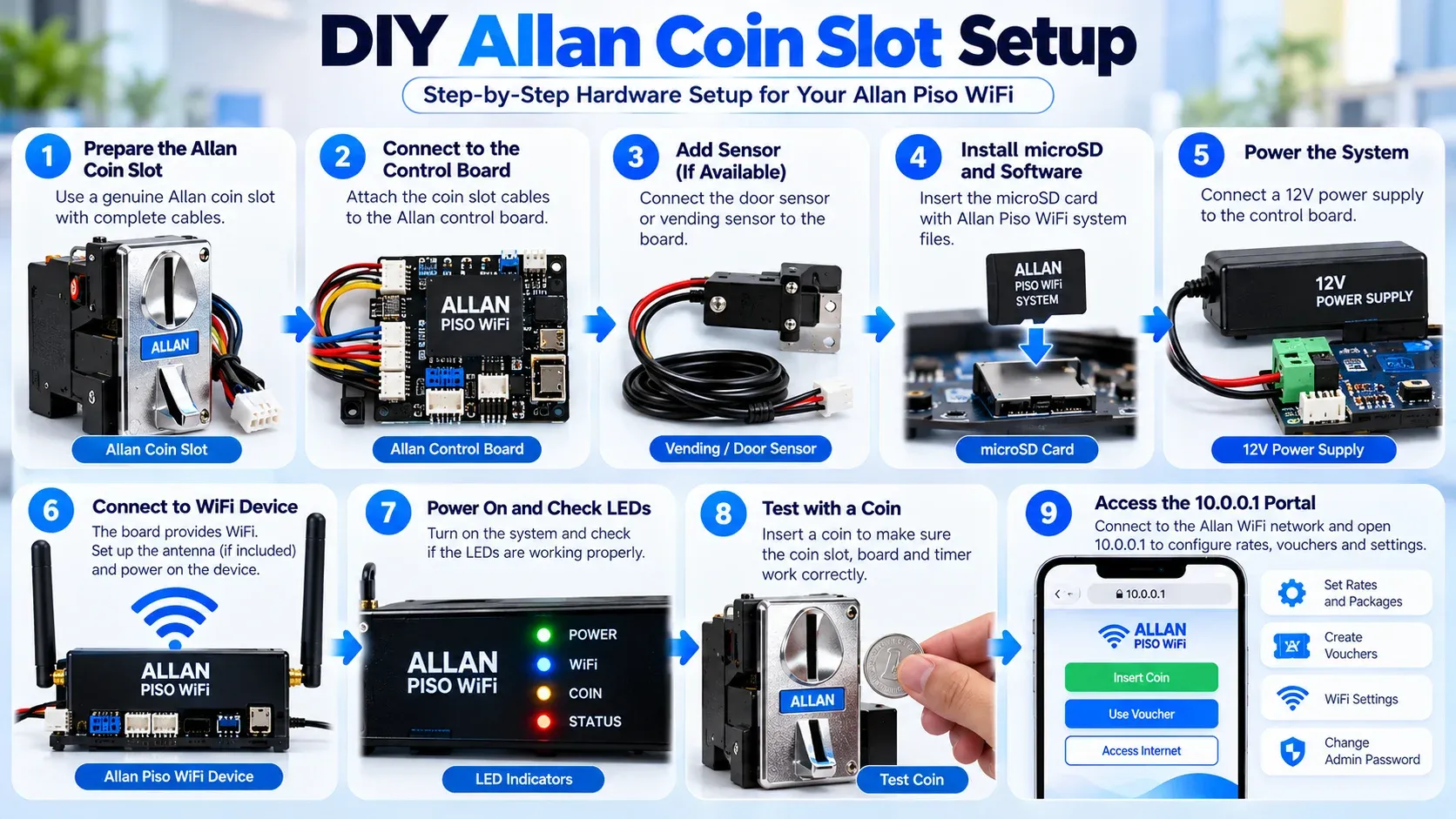
DIY Allan Coin Slot Setup
A DIY setup uses separate hardware parts that must work together correctly. The exact wiring and software can differ by board, so always follow the guide for your own hardware.
- 1Connect the coin slot to a compatible control board.
- 2Match each wire and connector with the hardware instructions.
- 3Add an infrared sensor if your setup uses one for coin detection.
- 4Install compatible Piso WiFi software on a microSD card.
- 5Insert the card into the selected board or computer.
- 6Power on the system and wait for it to start.
- 7Set up the WiFi network and customer portal.
- 8Configure the payment and coin settings.
- 9Test the coin slot and internet connection before customer use.
If you are building a machine from separate parts, the Piso WiFi Vendo setup provides the main hardware and payment components.
Piso WiFi Pause Time
The Piso WiFi Pause Time allows you to stop your paid timer while you are not using the internet. This can help prevent unused minutes from continuing to count down during a break. However, Pause Time depends on the software and settings used by the owner.
Turning off WiFi is not necessarily the same as pausing a session. Use the actual Pause option on the customer portal when it is available. This gives the system a clear request to stop the active timer.
How to Pause Allan Piso WiFi
You can pause your session when the Pause Time feature is available. Check your remaining time before you pause so you know how much time is left. Here is how you can do it:
- 1Stay connected to the Piso Allan WiFi network. Enter 10.0.0.1 in your browser.
- 2Search for the Pause or similar session-control option. Its location may vary by software.
- 3Tap the Pause button and wait for confirmation. Do not close the page before the action is completed.
- 4You can disconnect after the session has been paused. Your remaining time should follow the rules set for that machine.
Allan Piso WiFi Build Options
There are different ways to build an Allan-based Piso WiFi setup. A complete unit is designed for owners who want less hardware assembly, while a custom build gives you more control over the components you use.
Allan Piso WiFi Machine Setup
The setup process depends on the hardware and type of machine you use. A ready-made unit is usually easier to set up, while a DIY build may need more manual work. Follow the instructions that match your machine type.
- 1Connect your supported internet source to the machine or router. Make sure the main connection works before configuring customer access.
- 2Use the correct power supply for your equipment. Keep the machine in a dry and secure location.
- 3Open the authorised admin area provided for your setup. Only the owner or an approved administrator should use these controls.
- 4Set the WiFi name, customer rates, session rules, and available voucher options. Use settings that match your business needs.
- 5Replace any default admin password with a strong password generated by Password Generator. You should keep the Piso Wifi login information away from customers.
- 6Connect a separate phone to the customer WiFi. Test payment, portal access, internet service, and Pause Time if enabled.
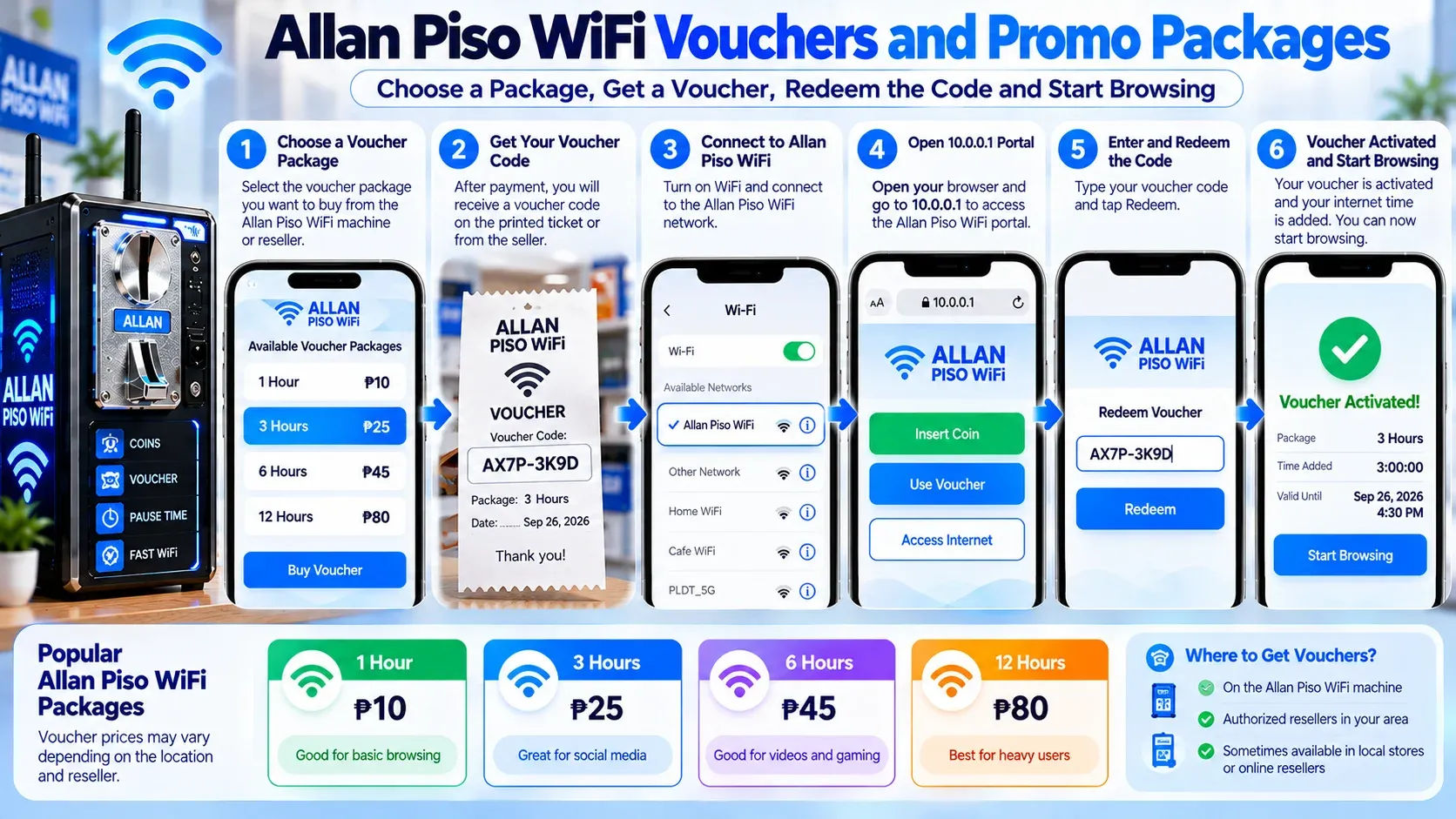
Allan Piso WiFi Vouchers and Promo Packages
There are some WiFi machines that have the option to purchase internet time with vouchers rather than coins for each session. Internet access may be included in a promo package for a specific amount of time, like a daily or weekly plan. The packages and rates available vary according to the settings set by the machine owner.
A Piso Wifi voucher allows you to add internet time without inserting coins into the machine. You need a valid code from the owner before you can activate your session. Here is how you can use it:
- 1Inquire with the owner if there are any vouchers or promo packages.
- 2Select a package that is right for your internet time.
- 3Send the necessary payment and receive your voucher code.
- 4Connect to Piso Allan WiFi.
- 5Open 10.0.0.1 in your browser.
- 6Type in the voucher code in the box provided.
- 7Do not begin browsing until you are told it is safe to do so.
Common Problems and Fixes
Some problems come from the WiFi connection, payment system, or machine settings. Check the affected part first before changing other settings. Here are some common issues and their fixes:
The WiFi network can still be visible even if the primary network is down. For this, test the ISP connection and restart only the equipment that is necessary.
Coin detection may be inaccurate due to dust, blockage, loose wiring or poor calibration. For this, check the coin acceptor before resetting the complete system.
Make sure that the code is typed properly. The voucher could have expired; it may have been used already, or it may not be supported by that machine.
Coverage may be limited due to distance, walls, interference, or access-point placement. The connection can be enhanced by moving closer to the machine.
If you face this problem, reconnect to the network, then open 10.0.0.1. A temporary browser connection might also be helpful.
Allan Piso WiFi for Small Business
Piso Allan WiFi is useful for small business on the internet in barangays and sitio areas. It could be suitable for sari-sari shops and other local establishments where customers require cheap internet. The initial setup may also be less costly than opening of a full-fledged internet café.
After installation, the machine can handle paid customer sessions with minimal daily handling. Before you begin, select a safe spot with a steady power supply and internet connection. Also, you should confirm if a permit or business registration is necessary in your region.
Installation Requirements
Allan Piso WiFi Maintenance
Small problems can become big problems if not addressed on a regular basis. Pay attention to the coin slot, cables, router, power supply, and internet connection. Owners can also:
Frequently Asked Questions
Will Allan Piso network work during a power outage?
No, it requires power to operate its router and other components. During brief outages, a UPS might maintain the operation of the machine.
What is the speed of Allan Piso WiFi?
There is no fixed speed for this WiFi network. Speed is dependent upon the internet plan, signal strength, router and number of users connected.
Does Allan Piso WiFi have a monthly maintenance fee?
There is no monthly maintenance charge for any setup. You may have internet, electricity, repairs, and other costs depending on your machine that you have to pay regularly.
Why Is 10.0.0.1 Allan Piso WiFi Not Loading?
You might be on the wrong network or have a VPN or mobile data connection. You should connect to the right WiFi and type 10.0.0.1 into your browser.
Can you use vouchers with Allan Piso WiFi?
Yes, some WiFi machines accept voucher codes. A valid code can be entered on the 10.0.0.1 portal to activate internet time. Voucher options are based on the machine owner's settings.
What Do the LED Lights Mean on Allan Piso WiFi?
A green light is a sign of normal operation, whereas an orange or amber light could be a connection or start-up problem. The meaning of the LED can differ between various models of the router.
Conclusion
Allan Piso WiFi offers paid WiFi access via coins, vouchers and timed sessions. The 10.0.0.1 portal is available for users to access, and Pause Time is available if supported. Stable internet, security measures for admins, and regular maintenance are important for the proper functioning of the system.