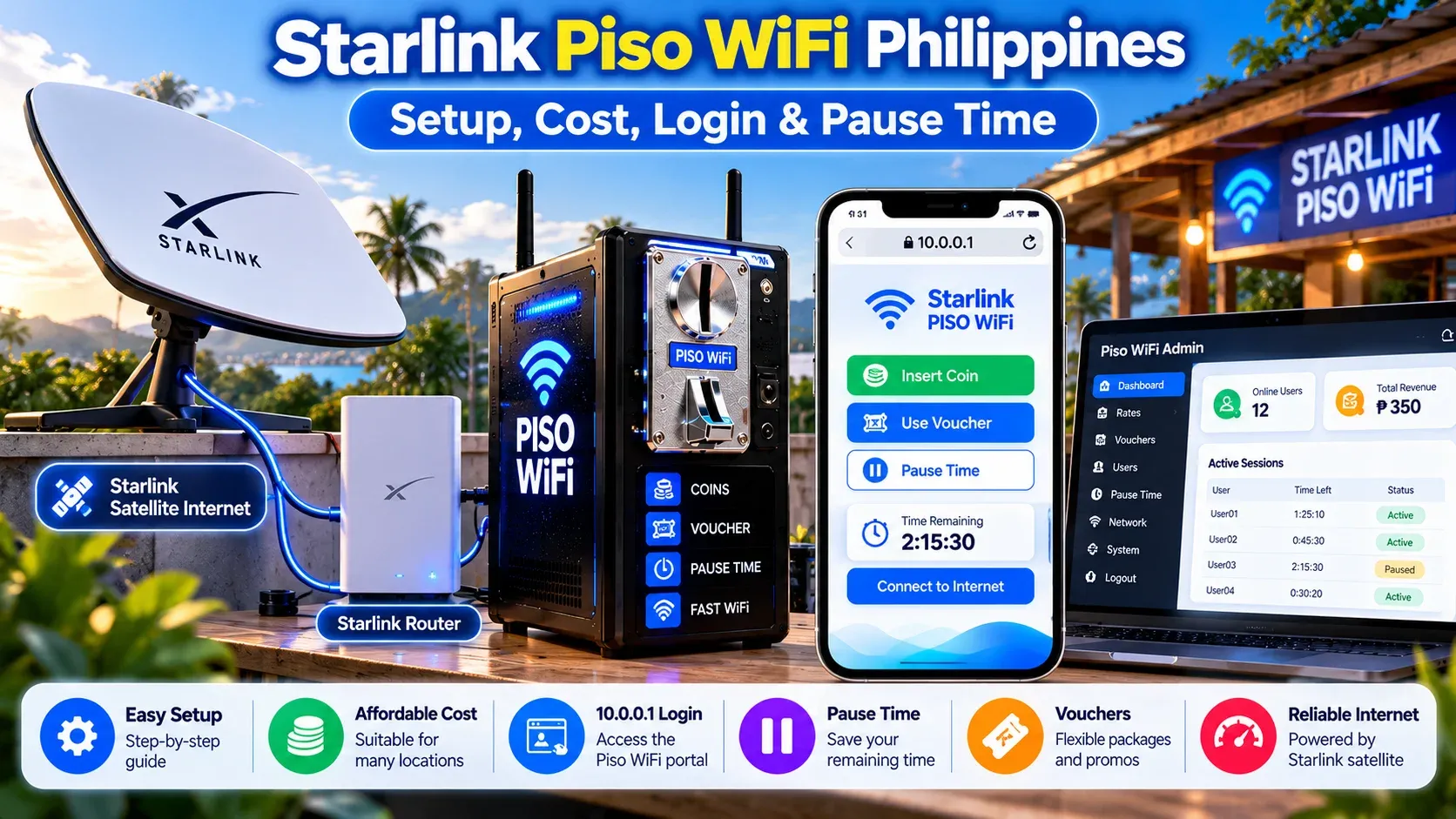
Piso WiFi businesses can be challenging in certain regions of the Philippines where fibre is not available or mobile internet is weak. If the connection is bad, it can disrupt customers' sessions and impact your daily income. Starlink Piso WiFi is another solution that provides satellite Internet in rural, remote and other regions where Internet service is limited.
Setting it up involves more than connecting a Starlink dish to a Piso WiFi machine. You must have the proper plan, equipment, payment system, and portal configurations. We will guide you on how to set up WiFi, access the 10.0.0.1 login, use Pause Time, and check costs and rates.
What Is Starlink Piso WiFi?
Starlink Piso WiFi combines a normal Piso WiFi vendo machine with a Starlink internet connection. The machine includes a router, coin acceptor, digital payment option, and firmware such as LPB, AdoPiSoft, or JuanFi. These parts control customer payments, rates, vouchers, and internet sessions.
The only difference is the Internet connection source. A regular machine is one that uses PLDT, Globe, Converge, fibre or mobile data. A machine is connected to the internet via a satellite dish using Starlink. This can make this WiFi useful in areas where a standard wired internet connection is not available.
How Does Starlink Piso WiFi Work?
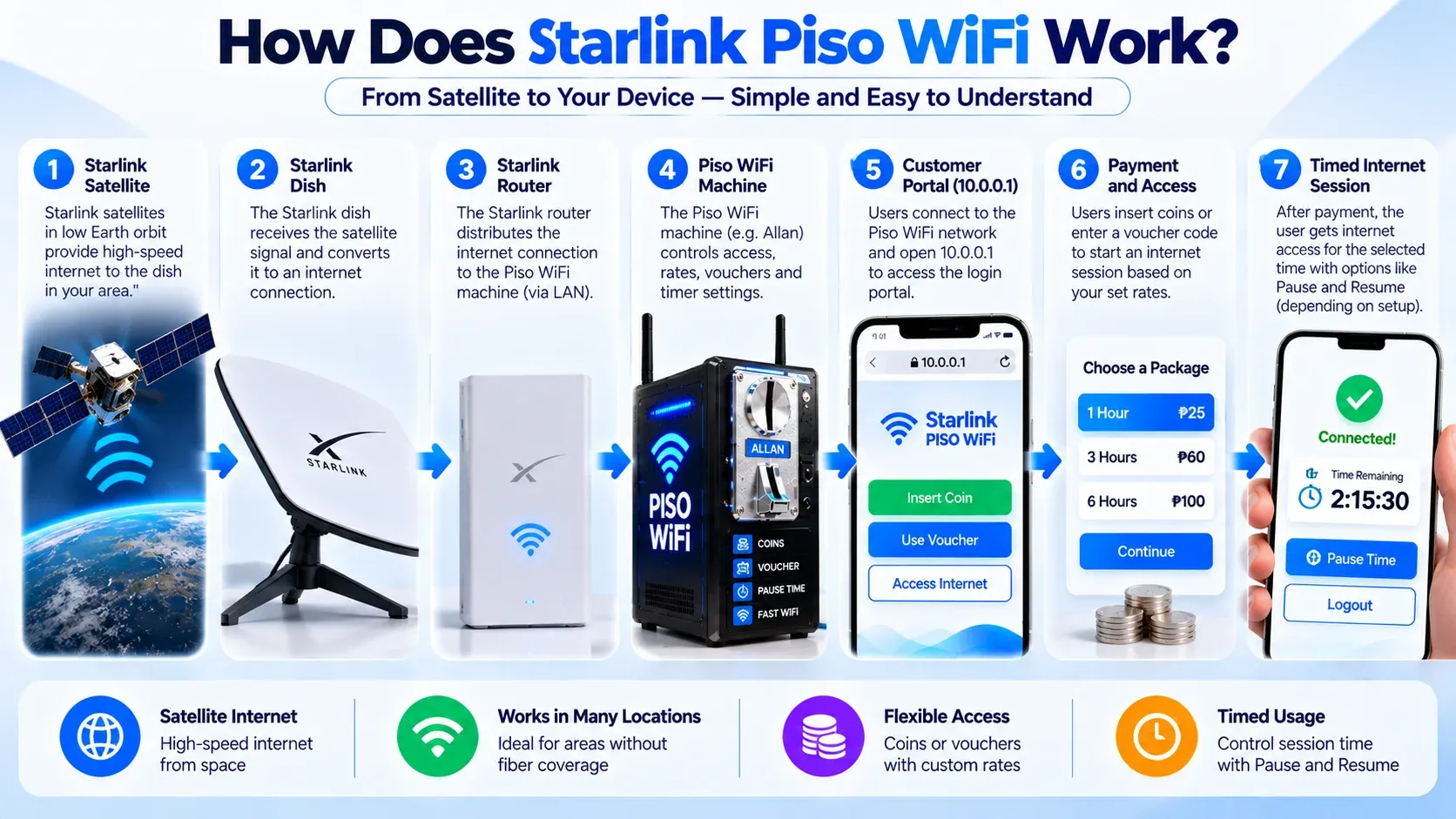
The Starlink dish provides internet connectivity to your Piso WiFi machine, and the router distributes it to customers. The process is as follows:
- 1The Starlink dish is connected to the satellite network.
- 2The connection is connected to the Starlink router or network equipment.
- 3The internet connection is provided to your Piso WiFi router.
- 4Customers use the local wi-fi network.
- 5They activate the payment or session gateway.
- 6They pay with coins, vouchers or a supported digital payment method.
- 7The system provides them Internet access for a period of time or for a certain amount of data.
- 8The session ends, pauses or continues depending on the firmware settings.
Starlink Piso WiFi vs Regular Piso WiFi
Both systems offer paid WiFi to customers. The following are the key differences in connection ID, setup and cost.
| Feature | Regular Piso WiFi | Starlink Piso WiFi |
|---|---|---|
| Internet source | Fibre, DSL, cable, or mobile data | Satellite internet |
| Best location | Areas with reliable wired service | Remote or no-fibre areas |
| Satellite dish | Not needed | Required |
| Piso WiFi firmware | Supported | Supported |
| Coin payments | Supported | Supported |
| Digital payments | Depends on machine | Depends on machine |
| Clear sky view | Not needed | Needed |
| Local portal | Depends on firmware | Depends on firmware |
Check the Right Starlink Plan Before Setup
It is important in the Starlink plan, customers pay for the use of your internet connection. The current Starlink terms do not typically permit resale of internet service without the express permission of Starlink. However, the terms state that a Priority Plan can be used to resell access as community WiFi or a hotspot.
You should review your plan before opening up a paid hotspot. Don't take any of the rules of a normal residential package for granted if it is a business or Priority plan. It may also modify its terms and plans. Therefore, check the latest information before purchasing equipment.
Starlink Business Plan Prices in the Philippines
Your monthly internet cost depends on the amount of Priority data you choose. As of September 2026, Starlink lists Local Priority 50 GB at ₱1,650 per month in the Philippines. Higher plans are available for businesses that need more data.
| Plan | Monthly Price |
|---|---|
| Local Priority 50 GB | ₱1,650 |
| Local Priority 500 GB | ₱4,650 |
| Local Priority 1 TB | ₱8,400 |
| Local Priority 2 TB | ₱15,900 |
How Much Does a Starlink Piso WiFi Setup Cost?
The monthly Starlink plan is only one part of the total cost. You also need the Starlink kit, Piso WiFi machine, router, coin acceptor, firmware, cables, mounting equipment, and payment system. The final amount can change depending on the hardware and supplier you choose.
The supplied market examples place some basic DIY Piso WiFi kits around ₱6,000 to ₱9,000. Some ready-made vendo machines are around ₱15,000 to ₱30,000. Older estimates put a complete Starlink-based setup around ₱35,000 to ₱58,000, but hardware prices can change and should be checked before buying. Your budget usually includes:
How to Set Up Starlink Piso WiFi?
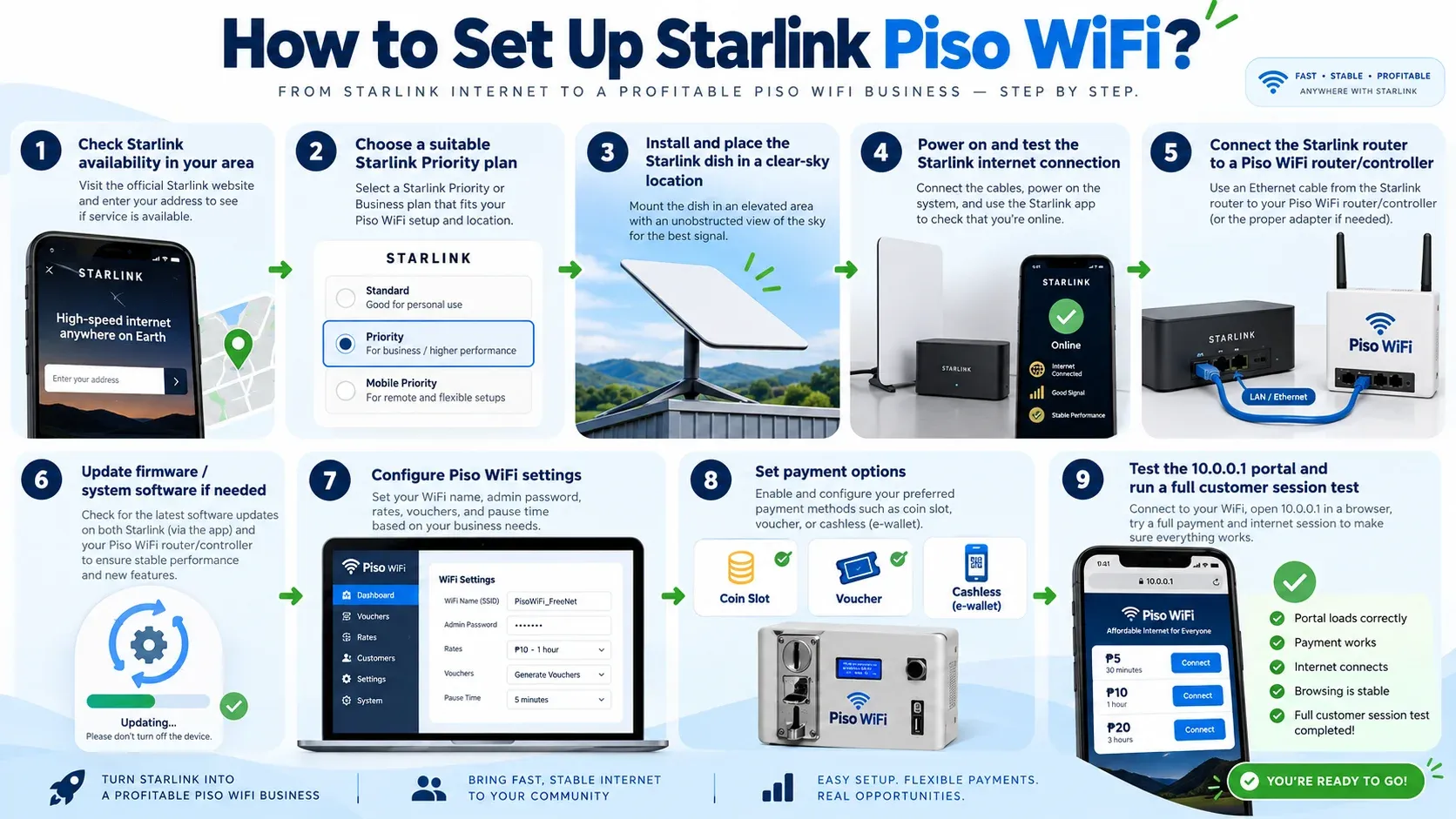
A good setup starts with Starlink before you configure customer access. Make sure service is available at your location and find a place where the dish has a clear view of the sky. To set up a Starlink Piso network, follow the steps below.
- 1Check the availability of Starlink at your location.
- 2Choose a suitable Priority plan.
- 3Mount the Starlink dish in an unobstructed and safe location.
- 4Verify that Starlink Internet is functioning.
- 5Plug in the Piso WiFi router to the Starlink network.
- 6Set up LPB, AdoPiSoft, JuanFi or your firmware of choice.
- 7Enter your Internet rates and session times.
- 8Create coins, vouchers, GCash, Maya or other supported payments.
- 9Test the customer portal.
- 10Test payment, internet access, pause, resume, and session ending.
How to Connect Starlink to a Piso WiFi Router?
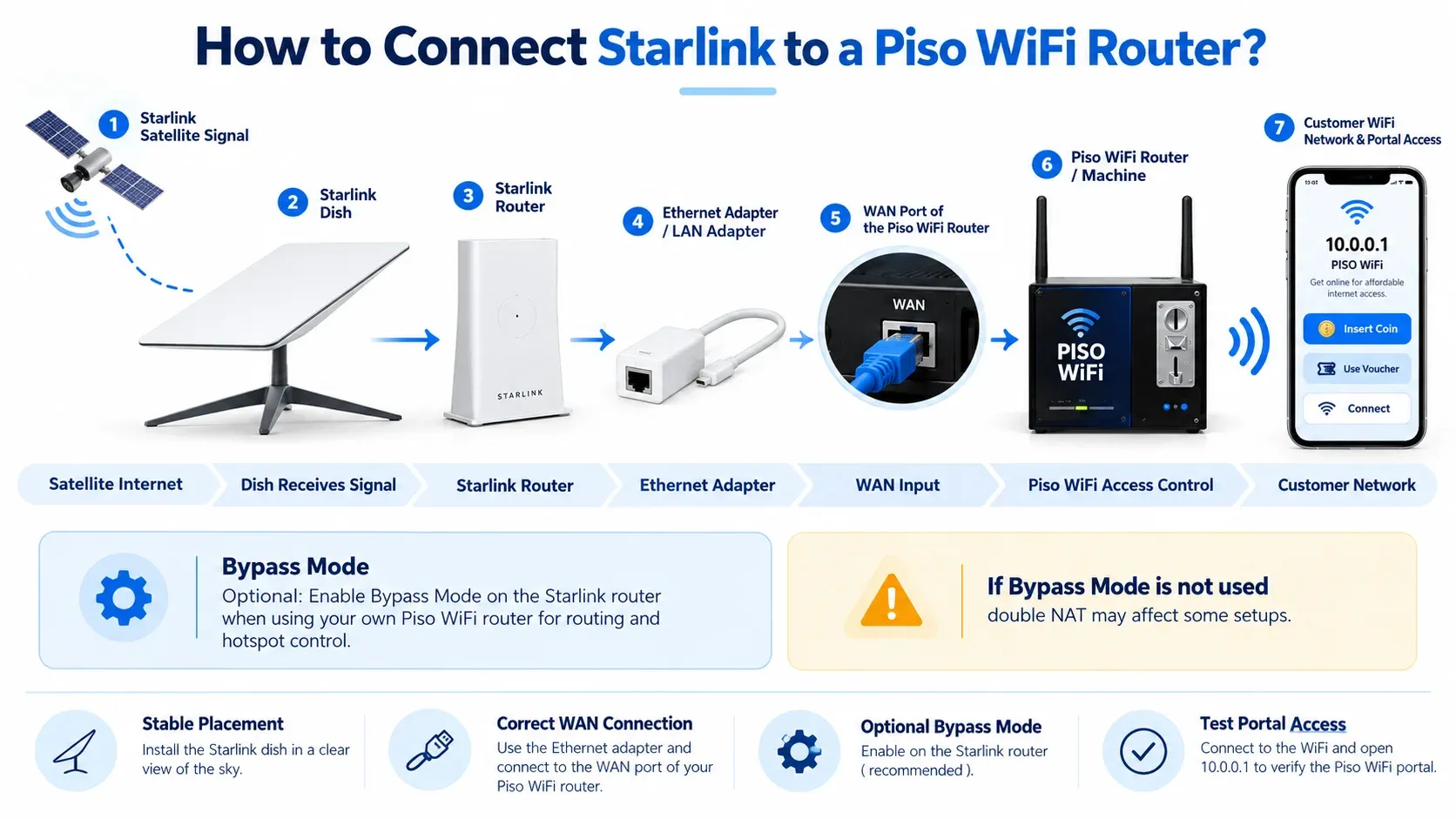
Starlink internet connection and customer access via Piso WiFi router. To connect to a Piso WiFi Router, follow these steps:
Set Up Starlink
Set up your Starlink dish and connect it to the Starlink equipment. Make sure the Starlink internet is working first.
Set up the Ethernet Connection
Connect your Starlink model to the supported Ethernet connection. Some kits may require an additional adapter.
Connect the Piso WiFi Router
Plug the Starlink network devices into the WAN port of the Piso WiFi router. Ensure that the cable is securely attached.
Router Configuration
Access the settings of your Piso WiFi router and set up your internet connection. Use the settings available for your particular system.
Consider Bypass Mode
For some setups, the Piso WiFi router is used to control the local network using Starlink Bypass Mode. This can prevent double-router or double-NAT problems.
Maintain the System
Use a phone or other device to connect to the Piso WiFi network. Before customers can use the customer portal or Internet connection, test it.
10.0.0.1 Starlink Piso WiFi Login
Once configured, customers can open up the local Piso WiFi portal using 10.0.0.1. This address is part of the local network configuration. This is not the Starlink login page.
This will vary depending on your firmware. Some systems might assign 10.0.0.1 to customers and 10.0.0.1/admin to the owner. Other systems, such as LPB Wifi, JuanFi, ADO Piso WiFi, etc can have different admin paths or settings.
How to Open the Starlink Piso WiFi Login?
The local portal should open when your device is connected to the machine's WiFi network. If you use a mobile data connection or another WiFi network, the page may not display. To access the Starlink WiFi, follow the steps below.
- 1Join the Piso WiFi network with your phone or laptop.
- 2If necessary, disable mobile data.
- 3Open Chrome, Safari, or another browser.
- 4Type http://10.0.0.1 in the address bar.
- 5Wait for the customer portal to load.
- 6Select the payment/session option.
Starlink Piso WiFi Admin Login
The admin area is for the machine owner or an authorised administrator. It can manage rates, sessions, vouchers, and other settings. Available controls depend on your firmware. Controls in the dashboard include:
What Is Starlink Piso WiFi Pause?
It allows a customer to pause an internet session and save any unused time for later. The feature is not a Starlink satellite connection; it's part of the Piso WiFi firmware. The pause time can then be managed in a similar manner to another Piso WiFi machine when using a Starlink-powered machine.
How to Use Starlink Piso WiFi Pause Time
The Piso WiFi Pause time option can be useful when you need to stop browsing before your paid minutes are finished. For this, you should use the actual Pause button when it appears on the customer portal. Follow these steps to do it:
- 1Connect to the Piso WiFi network.
- 2Open 10.0.0.1.
- 3Review the current active session.
- 4Find the Pause button.
- 5Select Pause.
- 6Wait for the portal to confirm it.
- 7If necessary, turn off WiFi.
- 8Reconnect to the same network at a later time.
- 9Click the portal once again.
- 10Now, click Resume to resume your session.
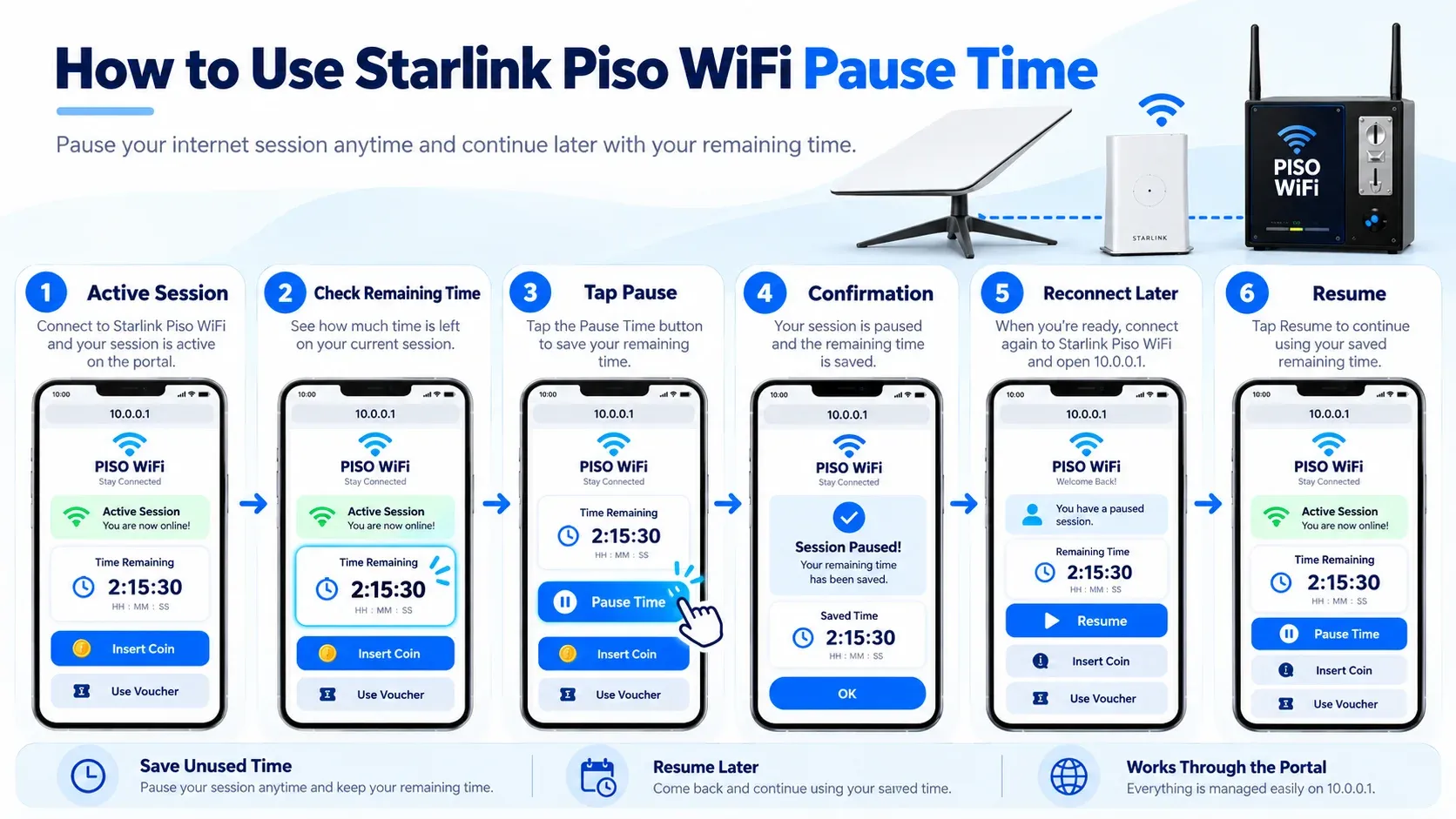
A missing Pause button does not always mean there is a connection problem. The machine owner may have turned the feature off, or the firmware may not support it. A different portal version can also place the control somewhere else. Customers should check the full portal before assuming the feature is unavailable.
How to Set Internet Rates?
Internet rates decide how much customers pay and how much access they receive. Keep your rates affordable while covering your costs. One sample Piso WiFi rate structure from the supplied material is:
| Payment | Example Time |
|---|---|
| ₱1 | 15 minutes |
| ₱5 | 1 hour |
| ₱10 | 3 hours |
| ₱20 | 8 hours |
Coin and Cashless Payment Options
A Starlink connection does not change how customers pay your Piso WiFi machine. Payment is handled by the vending hardware and firmware. Depending on your setup, customers may use coins, vouchers, GCash, Maya, or another supported method.
Cashless payments can reduce the need to collect coins every day. However, the payment integration should be tested carefully. A customer should never be charged without receiving the correct internet time.
Starlink Piso WiFi Coverage in the Philippines
Starlink is useful because it does not need a fibre line running directly to your property. This makes it an option for rural barangays, islands, mountain areas, farms, and other places where wired internet is limited.
A satellite connection still needs a suitable installation point. Check Starlink availability for the actual location and make sure trees, walls, roofs, or other objects do not block too much of the sky.
Starlink can be useful for:
Benefits of Using Starlink for Piso WiFi
The biggest advantage is the ability to provide internet where normal wired services are difficult to install. This can make internet access possible in places with fewer options.
Other benefits include:
Starlink Piso WiFi or Fibre: Which Connection Fits Your Setup?
Both fibre and Starlink Piso WiFi can provide internet for a Piso WiFi business. Your choice mainly depends on local coverage, connection needs, and monthly costs.
Fiber is the best choice for you when:
Starlink is a good option for you if:
Starlink Piso WiFi Franchise Packages
Some Philippine suppliers offer packages that can be used as a Piso WiFi service, or a complete Piso WiFi service. Before paying, you must know what is included in the package.
Government Starlink Projects and Private Piso WiFi
Government satellite internet projects and private Starlink Piso WiFi businesses serve different purposes. Public programs provide free internet in areas with limited connectivity, while a private Piso WiFi machine charges customers for internet time. Before setting up your machine, check what internet options are already available in the area.
How to Register Your Piso WiFi Business
Before starting a Piso WiFi business, check the local registration and permit requirements. These rules can differ by city or municipality. The process usually includes the following steps:
- 1Registering the business name with DTI for a sole proprietorship.
- 2Checking barangay requirements.
- 3Filing the necessary local business or Mayor's Permit.
- 4Filing the relevant BIR registration.
What is the Earning Potential of a Starlink Piso WiFi Machine?
Income varies significantly from one place to another daily. The examples show that some machines can earn around ₱500 to ₱3,000 per day. However, actual income can vary and is not guaranteed. Results vary with:
Tips for Running the Machine Better
Regular care keeps your Piso WiFi machine working well for customers. Here are some tips to follow:
Starlink Piso WiFi Maintenance
Both your Starlink gear and Piso WiFi machine require maintenance. Many of these issues can be avoided by doing some basic checks. You should check these areas regularly:
Common Starlink Piso WiFi Problems and Fixes
Even with a proper setup, you may sometimes face slow internet, Piso Wifi login errors, or payment issues. Common issues and their causes can help you find the right fix quickly.
10.0.0.1 Is Not Opening
You should connect your mobile phone to the Piso WiFi network. Switch off mobile data and VPN, and type http://10.0.0.1 into the web browser. If the page still does not show, clear the cookies and cache, or use another browser or reconnect to WiFi.
Portal Opens, But There Is No Internet
Verify the customer's paid session. If the session is fine, then see if the internet is available on Starlink. The WAN connection between Starlink and the Piso WiFi router should also be checked.
Payments are Accepted, But No Time is Added
This is typically a Piso WiFi payment system firmware, and not the Starlink connection. Test the coin acceptor, payment integration and rate settings. Make sure to pay the same amount as the session added.
Pause Time Doesn't Work
Make sure that the feature is on the machine. Do not turn off WiFi; use the Pause button. Reconnect with the same device when trying to resume the session.
Internet Becomes Slow During Busy Hours
More connected users can increase network demand. Starlink also states that performance can vary by location, time of day, network demand, and service plan. Priority data receives higher network precedence than lower-priority data.
FAQs
How much can you earn from Starlink Piso WiFi per day?
You may earn around ₱500 to ₱3,000 per day in a busy area. Your actual income depends on location, rates, and customer demand.
Why can't I see the Pause button?
The feature can be disabled by the machine owner or unsupported by the installed firmware. The owner can check the pause settings in the authorised admin dashboard.
Can Starlink internet be resold through a hotspot?
Starlink's current terms state that Priority Plan customers may resell access as community WiFi or a hotspot. Always check the latest Starlink terms before offering paid access.
How much is the cheapest listed Starlink Priority plan?
As of September 2026, the Philippine Starlink business page lists Local Priority 50 GB at ₱1,650 per month. Prices can change, so check the official page before purchasing.
Does a Piso WiFi business need permits?
Business and local permit requirements apply depending on your location and business structure. You should confirm the exact requirements with your barangay, municipality, city, DTI, and relevant tax authorities before opening.
Conclusion
Starlink Piso WiFi can provide paid internet where other connections are limited. Starlink supplies the internet, while Piso WiFi manages payments, sessions, and Pause Time. A proper setup and regular maintenance can help the service run smoothly.